Freestanding·wall·touch·outdoor
Digital Signage Kiosks: Freestanding, Touch and Interactive, Priced
Digital signage kiosks built around Samsung commercial panels in 43" and 55" portrait. The panel price is live from our store: $780 for the QM43C, $1,199 for the QM55C. Enclosures and touch overlays are quoted, and we say so instead of guessing.
Call (201) 834-6412. We built the kiosk in Penn Station's Moynihan Train Hall, so we'll ask where the outlet is.
Build a digital kiosk and see the panel price
Pick the size, the light it stands in, touch and the housing. Touch overlays and enclosures aren't sold on displaydetails.com, so those lines say "Quoted" and we price them within 1 business day.
Panel prices as of November 6, 2026, live from displaydetails.com. Enclosures and touch overlays aren't sold off the shelf, so we quote them instead of guessing.
- Authorized Samsung ResellerSourced through TD SYNNEX
- Free freight shippingEvery order, contiguous US
- 3-year Samsung warrantyCommercial use, we help file claims
- Quotes in 1 business dayMon–Fri, 9am–6pm ET
- POs & tax-exempt acceptedNet terms for approved accounts
- NYS-Certified WBECrown Heights Communication, Inc. · #75148
- Part of CrownTV10,000+ screens installed since 2012


DisplayDetails is the online store of Crown Heights Communication, Inc., the New York company behind CrownTV. Same team, same phone line.
Panels
Panel and enclosure combinations we build
Every kiosk is a panel, a housing, a player and content. The panel is the part with a fixed price, so it's the part we list. A short spec line is below; full Samsung specs live on the QM55C spec page and its siblings.
| Panel | Spec | Best for | Enclosure | Panel price | Buy |
|---|---|---|---|---|---|
| Samsung QM43C Most common kiosk panel. 22 in wide in portrait. | 500 nits · 24/7 · 4K | Lobby directory, check-in, menus | Floor, wall or counter, quoted | $780 | Buy |
| Samsung QM55C Reads from farther away, 27.9 in wide in portrait. | 500 nits · 24/7 · 4K | Wayfinding, retail promos, self-order | Floor, wall or counter, quoted | $1,199 | Buy |
| Samsung QH55C 700 nits for rooms with daylight. | 700 nits · 24/7 · 4K | Glass atriums, malls with skylights | Floor, wall or counter, quoted | $1,647 | Buy |
| Samsung OM55B Pressed Juicery Penn Station kiosk. | 3,000 nits · 24/7 · 4K | Kiosks that face a storefront window | Floor, wall or counter, quoted | $2,750 | Buy |
| Samsung OH55A-S Outdoor panel, -30 to 50 °C. | 3,500 nits · 24/7 · 1080p | Outdoor kiosks, drive aisles, campuses | Outdoor housing, quoted | $5,499 | Buy |
Prices as of November 6, 2026, pulled from displaydetails.com when this page was built. Enclosure, touch and install: quoted.
Use cases
Where kiosks earn their floor space
A kiosk takes up about 30 by 48 inches of floor once you count the space a person needs to stand in front of it. That's the clear floor space the ADA calls for, and it's the first thing a landlord asks about. Here's where we see it pay for itself.
- Retail wayfinding. A 55" portrait directory at a mall entrance or a multi-floor store. Map and store list, updated from one login. More on wayfinding kiosks.
- Lobby directory. A 43" in an office lobby listing tenants by floor. Usually no touch; a QR code on screen does the job for less.
- QSR self-order. A touch kiosk running the restaurant's ordering app, sending tickets to the kitchen. CrownTV's kiosk page lists Toast, Square and Olo support.
- Healthcare check-in. Patient intake and consent forms on a 43" touch kiosk at counter height. Keep it within the 15 to 48 inch reach range.
- Church giving. A giving app on a touch screen with a card reader. We don't sell card readers, so we quote the kiosk around the one your giving platform supports.
Not every one of these needs touch. A lobby screen people glance at for four seconds doesn't. Our interactive kiosk page covers when the software is worth it.
Software
Kiosk software: what runs on the screen
The QM43C and QM55C have a Tizen 7.0 player built in, so a non-touch kiosk needs no extra box. It plays a USB stick, a Samsung VXT playlist or a MagicINFO schedule. Samsung's VXT CMS Standard license was listed by CDW at $150 per display per year (checked October 22, 2026). For MagicINFO licensing, our sister site has the details on MagicINFO for QMC panels.
Touch kiosks usually run one web app in a locked, full-screen browser with an idle timer that clears the session. That's the "web kiosk" setup, and it's how most self-order and check-in apps are built. CrownTV's own kiosk software adds attract loops, session reset and single-app lockdown, and runs on its hardened player; its CrownTV Dashboard is $20 per screen per month billed annually on the published price list (checked October 22, 2026).
The mistake we see most: buying the hardware first and the software second. A check-in app that needs a camera and a badge printer changes the enclosure. Pick the app, then we size the box around it.
Installed by CrownTV
Kiosks installed by CrownTV
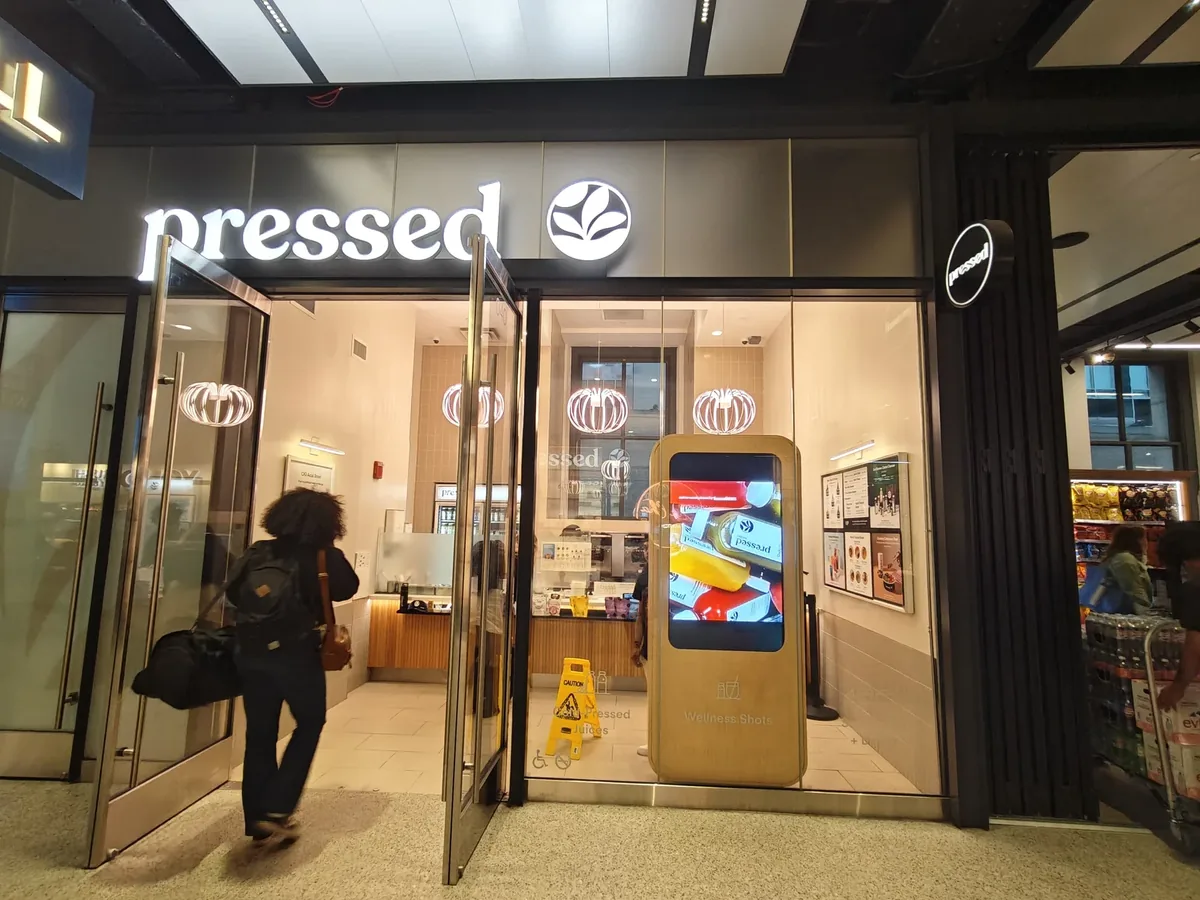
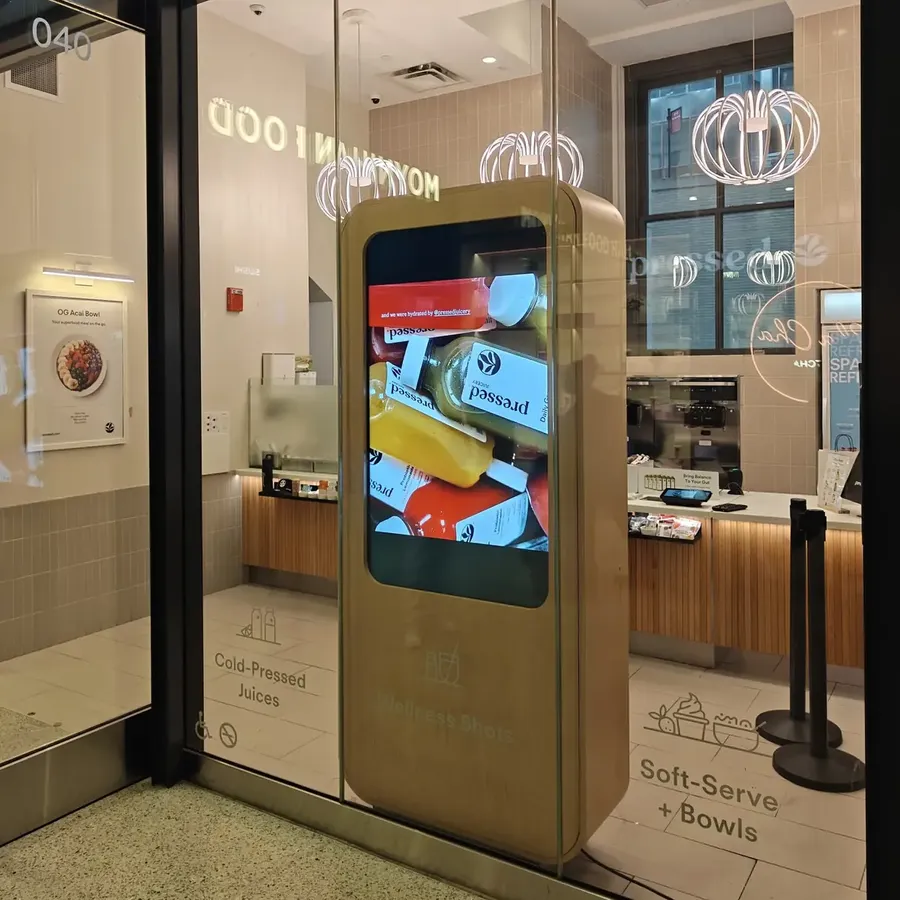
Penn Station is the job we point people to. The kiosk sits right behind the glass, so it gets concourse light all day. That's why it uses a 3,000-nit OM55B rather than a 500-nit QM55C. The enclosure is custom birch to match the store's millwork, and the same chain runs five 43" QMC menu boards in a row in its stores.
If you want CrownTV to do all of it, its kiosk program lists installed kiosks at $4,500 to $9,500 per unit, including hardware, install and first-year software (checked October 22, 2026). If you'd rather buy the panel and use your own fabricator, buy it here and ask for an install quote if you need hands.
See the kiosk pricing page for how those two routes compare, or the kiosk vs tablet stand page if you're not sure you need a kiosk at all.
Digital kiosk questions
What is a digital kiosk?
A digital kiosk is a commercial screen in its own freestanding or wall housing, often with a touch layer, that shows information or lets people do something on their own: find a store, check in, order, look up a product. The panel inside is the same Samsung display you would hang on a wall, usually a 43" or 55" in portrait.
What is the difference between a kiosk and a digital sign?
A kiosk is a digital sign in its own housing, usually freestanding and often with touch, and the panel inside is the same commercial display you would hang on a wall, so a QM55C on a wall is a sign while the same QM55C in a floor enclosure with a touch overlay is a kiosk.
How much more does a touch kiosk cost than a non-touch one?
The difference is the overlay plus the software that responds to touch, and both are quoted per job because DisplayDetails does not sell overlays off the shelf. The panel price is the same either way. See touch screen kiosks for what changes.
What height does an ADA-compliant touch kiosk need?
Anything a person has to touch must sit between 15 and 48 inches above the floor under the 2010 ADA Standards (sections 308 and 309). On a 55" portrait panel that is 48.7 inches tall, you keep the buttons in the lower part of the screen and use the top for content.
Can a kiosk run our web app?
Yes: the usual setup locks the screen to one URL in full screen and resets the session after a set idle time, which CrownTV lists as one of its three kiosk software options, and it is the cheapest route to an interactive kiosk because the app you already have does the work. If the app needs a camera, card reader or printer, tell us when you ask for a quote.
What power and network does a kiosk need?
One standard 120V outlet and, ideally, a wired Ethernet drop at the kiosk location. Samsung lists typical draw at 121 W for the QM43C and 154 W for the QM55C. Wi-Fi works, but a wired drop is what we'd plan for anything that takes payments or check-ins.
Can a digital signage kiosk go outdoors?
Only with an outdoor-rated panel and an outdoor enclosure. Samsung rates the OH46B and OH55A-S for -30 to 50 °C at 3,500 nits. An indoor QMC is rated for 0 to 40 °C, so it does not belong outside even in a box. See outdoor kiosks.
What is the lead time on a kiosk?
In-stock Samsung panels ship in 5–7 business days. The enclosure is the long part, and it depends on the maker and finish, so we give you a date with the quote. CrownTV quotes 4 to 6 weeks from signed quote to a live installed kiosk.
Who's behind this
The DisplayDetails team handles sales and hardware sourcing for DisplayDetails and its install arm, CrownTV. Since 2012 we've installed more than 10,000 commercial screens, for clients that include L'Occitane, the Victoria's Secret flagship on Fifth Avenue, Janie and Jack and Pressed Juicery. This site is where we write down what we tell buyers on the phone.
Questions about a specific screen? Call (201) 834-6412 or email hello@displaydetails.com.
Who runs this site is on about this site, and where each price and rule comes from is on how we research.